Online Manual
streamZ User Guide

2.3.1 Meeting Summary
The Meeting Summary feature converts live audio into structured, actionable documents, eliminating the need to re-listen to full recordings or manually take notes.
Intended Users

- Content Creators → Brainstorming logs, interview transcriptions, and podcast debriefs.
- Business Teams → Project planning, client requirement archives, and post-stream reviews.
- Educators/Knowledge Influencers → Course outlining and initial research screening.
-  ...
Recording and Preparation
To maximize AI accuracy:
- Audio Quality: Use an external microphone in noisy environments (cafes, halls). Clear audio allows streamZ precisely distinguish between speakers.
- File Specs: Audio files must be MP3 format and under 500MB.
📢 Tip

For very long meetings, record in segments to prevent upload interruptions or failures.
Upload and Process
There are two ways to generate a summary:
- Select audio file under the
STORAGEand submit. The system processes it automatically. - Use a Shared File Code to access audio from another streamZ device, avoiding physical file transfer.
Meeting Summary Modules
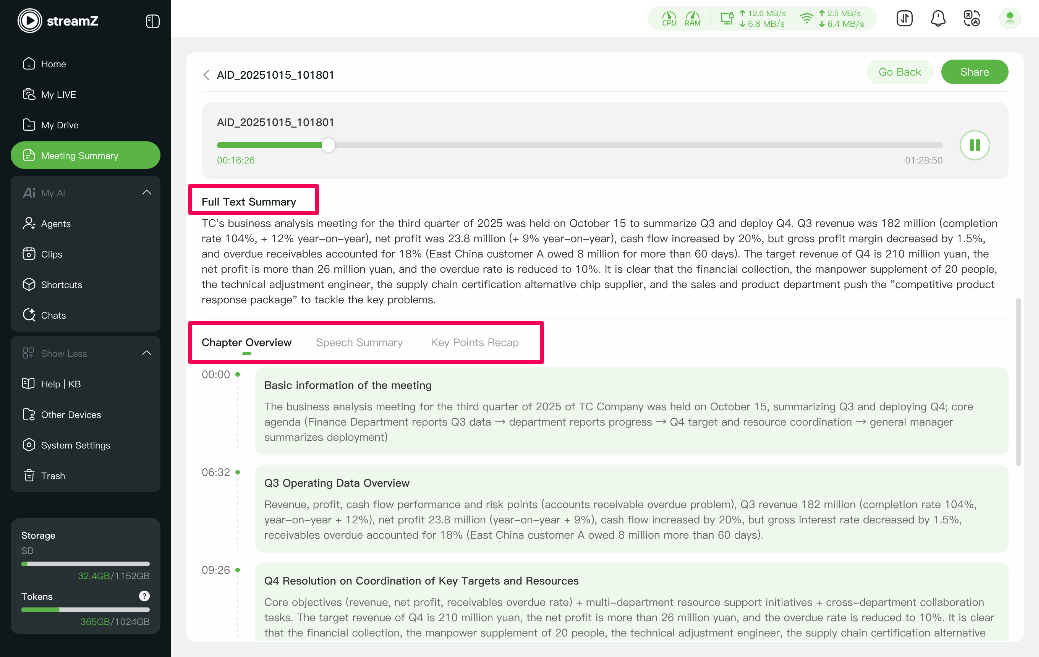
Each summary is divided into five modules for quick information digestion:
| Module | Desc. | Typical Use |
|---|---|---|
| Full Text Summary | Complete transcript of the meeting with key conclusions. | Update team members who could not ttend. |
| Meeting Details | Maps each statement to the original speaker and verbatim text. | Fact-Checking and verification. |
| Chapter Overview | Auto-generate timestamped segments. | Jump directly to key points efficiently. |
| Speech Summary | Group viewpoints by person to clarify stances and commitments. | Avoid confusion and clarify responsibilities. |
| Key Points Recap | Auto-generate a structured follow-up checklist. | Streamlining post-meeting execution; no manual organizing required. |